
ACCOUNT SET UP IS EASY
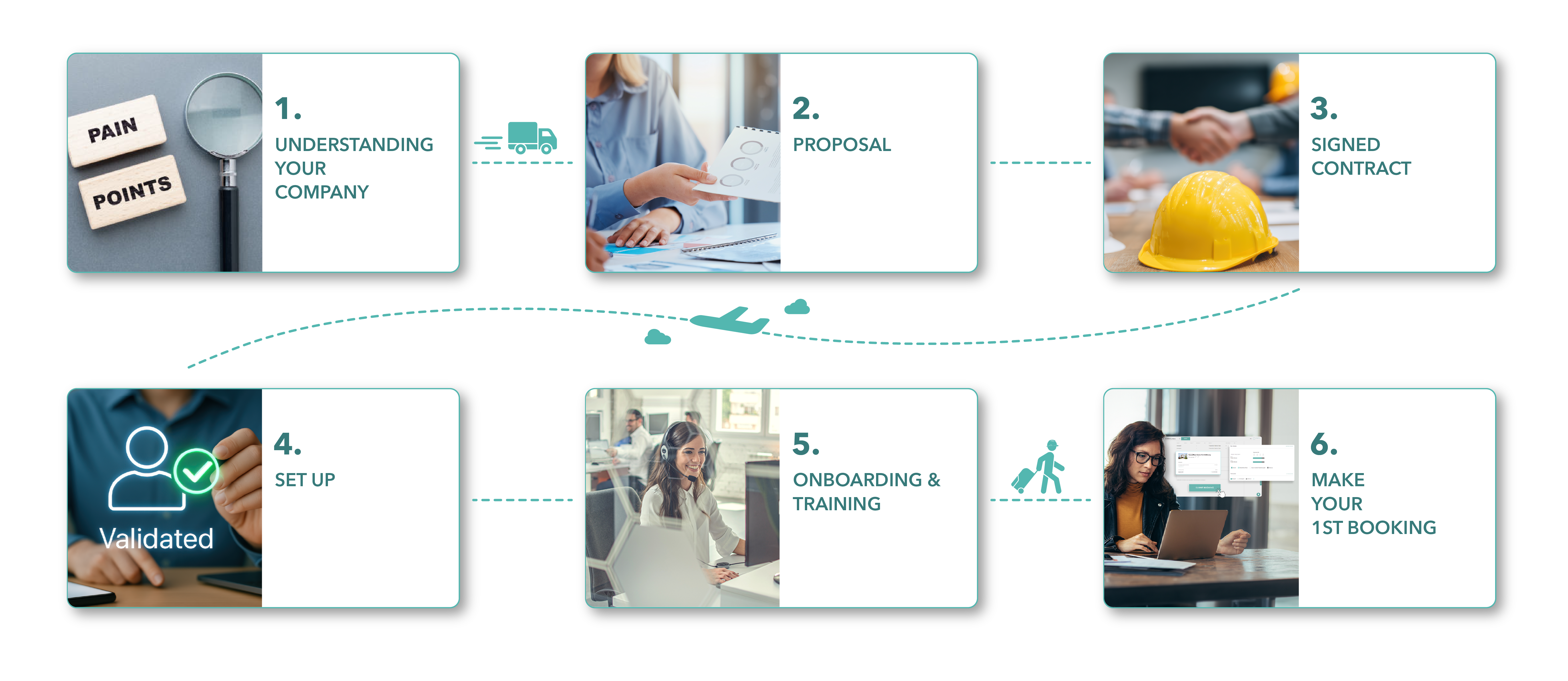
1. Understanding Your Company
- Understand your Booking Requirements
- Understand your Pain Points
- Review Sample Invoice
- Understand Your Account Requirements
- Demo LodgeLink Portal
After the client submit all of the required documents, LodgeLink will:
- Identify Any Pending Items
- Conduct a Soft Credit Check
- Information about your accommodation and travel requirements
- Corporate agreements with hotels, flights, rentals
- Policies for hotels, flights, rentals
- Billing Requirements
- Who
- Champion(s) of the solution
- Decision Maker(s)
- AP Contact
- Booker(s)

2. Proposal
- Review Proposal Details
- Send MSA & Fee Schedule
Optional:
- Send Credit Application
- If Accommodations & Travel, Define Split
Optional Additional Services:
- Travel Desk Services
- Flight Credit Tracking
- Flight Reporting
- Duty of Care Agreement
3. Signed Contract
Please sign and return these documents:
- MSA & Fee Schedule
- Optional:
- Signed Credit Application
- Any Added Travel Desk Services
- Signed Duty of Care Agreement
Please also provide:
- Legal Entity Name(s)
- Canada: GST number
- USA: W-9
4. Set Up
Set Up Hotel Bookings Customer Portal
- Submit Approved Credit
- Set Up Payment IDs*
- Set Up Cost Tracking Codes*
- Set Up Crew List*
Set Up Travel Desk Account
- Define Credit Split between Accommodations & Travel
Set Up Duty Of Care
*Set up for a fee
Portal
Champion will:
- Receive Email Set Up Link
- Create Login Credentials
- Create Account
- Account will remain pending until on boarding
Set Up
What We'll need:
- User List
- Organization Administrators
- Booking Administrators
- Crew List
- Payment ID
- Cost Tracking Codes
For Travel:
- Authorized Travel Bookers
- Approval Process
- Reporting Requirements
- Travel Profiles
- Optional:
- Who Receives Credit Tracking & Reporting
For Flights:
- Account Details for Corporate Agreements
- Reconfirm Travel, Air Fare Policies
For Rentals:
- Account Details for Corporate Agreements
- Reconfirm Rental Policies
What We'll need:
- User List
- Emergency Contacts
- Travel Profiles
5. Onboarding & Training
LodgeLink will:
- Activate Portal
- Review User Management
- Review Payment IDs / Cost Tracking Codes / Crew List
- Discuss Contacting Customer Service
- Review Project and Supply Requests
LodgeLink will:
- Introduction to your Dedicated Travel Advisor
- Reconfirm Flight and Rental Policies
- Discuss Contacting the Travel Desk Team
LodgeLink will:
- Magnatech Demo
- Notification Set Up
If needed, we can additionally support with
- Training Specific Users
- Training Divisions
- Training Roles
- Invite Users to Portal
- Organization Administrators
- Booking Administrators
- If not already set:
- Set Up Crew List
- Set Up Payment IDs
- Set Up Cost Tracking Codes
6. Make your 1st Booking
Hotels:
- 1st Booking on Portal
Travel Desk:
- 1st Flight Booking made with Travel Desk
- Credit Approved Accounts:
- Will receive an invoice up to 2 weeks after check out.
- For longer stays, will receive an invoice every few weeks
- Settlements will reconcile and match the booking with the folio prior to invoicing
- 1st Invoice Meeting / Call with your Dedicated Customer Success Representative
- Credit Card Payments:
- Will be charged up to 2 weeks after checkout
- For longer stays, will be charged partially every few weeks
- Pre-Authorization Charge at Time of Booking
- Settlements will reconcile and match the booking with the folio prior to charging
- Once charged, email sent with the receipt and Charge Sheets
- 1st Receipt Meeting / Call with your Dedicated Customer Success Representative
- Credit Approved Accounts:
- Invoices are issued 1 business day after ticketing
- Invoices may be delayed during financial periods or close to statutory reporting cycles.
- Credit Card Payments:
- Airline tickets processed immediately upon ticketing.
- Initial itinerary will include a link to the e-ticket and receipt.
- Invoices will post the following business day, which will include the airline and service fee.
- Service fee will be charged after the invoice posting.
- Invoices may be delayed during financial periods or close to statutory reporting cycles.
Review Accommodation Spend / Travel Spend
- Feedback
- Ongoing support with your Dedicated Customer Success Representative
- New User Training
- Ongoing Account Reviews
- Tips & Tricks and Product Updates